A PowerPoint template for the Lean Canvas
In the guide Canvases and templates
So, the Lean Canvas is making its way into people’s minds. You can create and edit yours on the Lean Stack website. I had a request for a PowerPoint version of it.
Download here the Lean Canvas PowerPoint template.
I have also created a Google Slide version (Make a copy) that you can duplicate and edit.
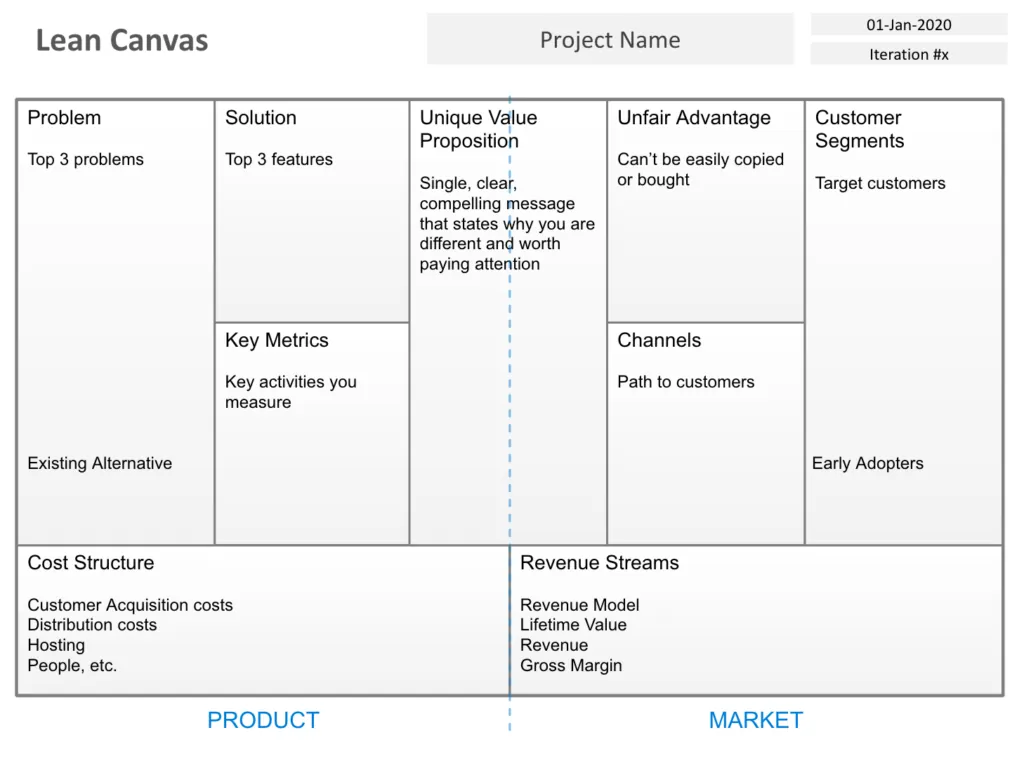
Added on September 30, 2026. The template is one slide with the nine boxes of the Lean Canvas: Problem, Solution, Key Metrics, Unique Value Proposition, Unfair Advantage, Channels, Customer Segments, Cost Structure and Revenue Streams, each with a short prompt such as “Top 3 problems”. Replace the project name, date and iteration number at the top, then fill in each box (in Google Slides, first use Make a copy in the File menu).
Added on October 7, 2026.
What is the Lean Canvas?
The Lean Canvas is a variant of the Business Model Canvas, designed by Ash Maurya for startups and based on the Lean Startup method. Its nine boxes help you write down the main assumptions behind an idea, so that you can test them one by one. To choose between the two, see which canvas for which project.
In what order do you fill in the Lean Canvas?
Fill it in as a team, in this order:
- Customer segments. Group customers by behavior rather than demographics: hikers who travel twice a year, not 20 to 25 year-olds. Then name your early adopters: if your offer were available today, who would buy it first, because they need it most?
- Problem. The top three problems these customers meet when they try to get a job done. “Too expensive” or “no time” are too vague: look for the real problem behind them. Next to them, note the existing alternatives, how customers solve these problems today.
- Unique value proposition. Say the reverse of the problem in one clear sentence. If small businesses struggle to find reliable designers in their area, the proposition can be “Find a reliable designer near your business”.
- Solution. The main features that solve each problem.
- Channels. How you will reach these customers. High-level assumptions are enough at this stage.
- Revenue streams. Who pays, how much and why exactly. Price is part of the product: it even decides who your customers are.
- Cost structure. What launching will cost, fixed and variable costs. An estimate that gets sharper as the project moves forward.
- Key metrics. The few numbers that show whether the business is moving forward: sign-up rate, orders per customer, renewal rate.
- Unfair advantage. What puts you in a better position than your competitors and cannot be copied easily: expertise, access to a unique resource, a network effect, an exclusive deal.
What do you do once the canvas is filled in?
Each box hides a risk. Test the assumptions one by one: do customers really have the problem, does your offer speak to them, will they pay your price? The first answers come from customer interviews. Then adjust the canvas: a new segment can mean new channels, a new problem a new value proposition. The canvas is a living document.
The same template exists in French, and the guide Canvases and templates gathers the Business Model Canvas, the Customer Profile and the Innovation Canvas.